#What it is
Animated Text FX is a family of resource packs that animate Minecraft text. You do not run commands or install a plugin to use an effect. Each effect is permanently bound to one hex color. When a player's client draws text in that exact color, the pack's text shader animates it.
The animation runs on the player's client. Players who do not have the pack applied simply see the flat color, so nothing breaks for them.
Only one text-effect pack can control text on a client at a time. If you want effects from more than one volume, use the Mega Pack (all 111 earlier effects plus 39 new ones, 150 in total). It replaces the earlier packs and keeps every hex code.
#The packs
All six products use the same method and the same six install variants. They differ only in which effects they contain. Counts below come from the effect lists shipped in the packs.
| Pack | Effects | What it adds | Showcase menu in the download |
|---|---|---|---|
| Animated Text FX (Vol. 1) | 25 | The original set: rainbow, fire, ocean, neon, matrix, lightning, aurora, confetti, a few ranks and more. | None |
| Animated Text FX Vol. 2 | 30 | Glitches, shimmers, fire, ice and seasonal styles. | None |
| Animated Text FX Vol. 3 | 26 | Staff ranks, rarity tiers, event and announcement effects, premium looks. | Yes, /textfx3 by default |
| Halloween Edition | 10 | Spooky effects: witch brew, blood moon, bats, ghosts, candy corn and more. | Yes, /halloweenfx by default |
| Christmas Edition | 20 | Festive effects: candy cane, snowfall, ornaments, jingle bells, Santa, fireworks and more. | Yes, /christmasfx by default |
| Mega Pack | 150 | All 111 effects above (same hex codes) plus 39 new ones in the range #540C00 to #540CA0. | Yes, 16 menu files, /textfx by default |
#Requirements
- Minecraft: 1.20.2 or newer. The packs declare pack formats 18 to 120 and carry a separate shader overlay for each Minecraft version range (details in Compatibility).
- Server: any server that can send a resource pack to players. The Resource Pack variant needs no plugin.
- Optional plugins: ItemsAdder, Nexo, BetterHUD or MythicHUD, only if you use one of them. Pick the variant that matches. DeluxeMenus is needed only for the bonus showcase menu (Minecraft 1.16+).
- Players: must accept and apply your server resource pack to see the animation.
#Choosing your variant
Each download contains six zips. Install only one, the one that matches the plugins your server really runs. Installing several, or a variant for a plugin you do not have, can conflict or simply do nothing. The Mega Pack file names are shown; the other packs use the same six variants with their own names.
The pack README says Nexo and ItemsAdder are the easiest to set up. BetterHUD and MythicHUD are only needed if you want the text inside your custom HUD (escape menu, hotbar, anywhere on screen).
| Variant | Mega Pack file | Use it when |
|---|---|---|
| Resource Pack | animated-text-fx-mega-pack-resourcepack.zip | You use no ItemsAdder, Nexo, BetterHUD or MythicHUD, or you want a standalone pack. |
| ItemsAdder | animated-text-fx-mega-pack-itemsadder.zip | Your server runs ItemsAdder. |
| ItemsAdder + BetterHUD | animated-text-fx-mega-pack-itemsadder-betterhud.zip | Your server runs both ItemsAdder and BetterHUD. |
| Nexo | animated-text-fx-mega-pack-nexo.zip | Your server runs Nexo. |
| MythicHUD | animated-text-fx-mega-pack-mythichud.zip | Your server runs MythicHUD. |
| BetterHUD | animated-text-fx-mega-pack-betterhud.zip | Your server runs BetterHUD without ItemsAdder. |
#Install: Resource Pack
- Single player or testing: put
animated-text-fx-mega-pack-resourcepack.zipin.minecraft/resourcepacksand enable it. - Server: host the zip and set
resource-pack=(andresource-pack-sha1=) inserver.propertiesto point at it. - Or merge it into the pack you already serve. Copy its
assets/folder and thetechnotypist_*overlay folders into your pack, and also copy theoverlayssection ofpack.mcmeta. - Have players reconnect or re-apply the pack.
Remove the old one from your hosting plugin or server.properties and upload the new one, as the 1.0.1 patch notes advise.
#Install: ItemsAdder
- Copy the
contents/technotypist_text_effectsfolder intoplugins/ItemsAdder/contents/. If an earlier Animated Text FX pack is installed it uses the same folder name, so replace it. - In
plugins/ItemsAdder/config.ymlturn ItemsAdder's own text effects off so the two do not fight over the same shader:
text_effects:
  enabled: false
  hide-scoreboard-numbers: false
  hide-scoreboard-numbers-old-clients: false

pre_1_21_2_shaders_fix:
enabled: false- Run
/iareloadand then/iazip, and re-apply the pack on the client.
#Install: ItemsAdder + BetterHUD
BetterHUD draws its HUD from its own text shader, so this variant gives ItemsAdder only the include files and hooks BetterHUD's shader instead.
- Copy
ItemsAdder/contents/technotypist_text_effectsintoplugins/ItemsAdder/contents/(replace any earlier Animated Text FX copy). - Open the
BetterHud/shaders (for BetterHud ...)folder that matches your BetterHUD version (the zip has folders for BetterHud 1.x, 2.0.x and 2.1.x) and copy its contents intoplugins/BetterHud/shaders/, overwritingtext.vshandtext.fsh. - Copy
BetterHud/external-assetsintoplugins/BetterHud/external-assets. - In
plugins/BetterHud/config.ymlset:
build-folder-location: ItemsAdder/contents/BetterHud/resourcepack
pack-type: folder
merge-other-folders:
- BetterHud/external-assets- In
plugins/ItemsAdder/config.ymldisable ItemsAdder's own text effects (the sametext_effectsandpre_1_21_2_shaders_fixblock as in the ItemsAdder install). - Run
/hud reload, then/iareloadand/iazip, then re-apply the pack.
Its text shader would overwrite BetterHUD's and the HUD would disappear.
#Install: Nexo
- Copy
pack/external_packs/animated-text-fx-mega-pack.zipintoplugins/Nexo/pack/external_packs/. Remove any earlier Animated Text FX zip from that folder. - Stop Nexo from generating its own text shader so it does not overwrite this pack's shader. In
plugins/Nexo/settings.yml, set the one key your version has. Do not add both.
# Newer Nexo versions (settings.yml has "default_gif_type"):
default_gif_type: SPRITE

# Older Nexo versions (settings.yml has "Glyphs.generate_gif_shaders"):
Glyphs:
generate_gif_shaders: false- Make sure Nexo can send the pack to players. Under
Pack: server:insettings.yml,type:must be a type your Nexo version supports. If the console says "Invalid PackServer type specified", change it to one of the types listed in that message, for examplePOLYMATH. WithSELFHOST, also setpublic_addressand open the port. - Run
/nexo reload pack, then re-apply the pack on the client.
#Install: BetterHUD
- Open the
BetterHud/shaders (for BetterHud ...)folder that matches the BetterHUD you run, and copytext.vshandtext.fshintoplugins/BetterHud/shaders/, overwriting the two files there. - Copy
BetterHud/external-assetsintoplugins/BetterHud/external-assets. - In
plugins/BetterHud/config.ymladd the folder tomerge-other-folders:
merge-other-folders:
- BetterHud/external-assets- Run
/hud reload, rebuild your resource pack and re-apply it on the client.
The two shader files are BetterHUD's own templates with two lines added: #moj_import <technotypist_text.glsl> above main, and if (technotypist_text_shader()) return; as the first line of main. If you update BetterHUD and it regenerates its templates, add those two lines again.
#Install: MythicHUD
MythicHUD generates its own text shader from your layouts, so a finished copy cannot be shipped (it would overwrite your HUD). You add a small patch to the shader MythicHUD already generated.
- Copy the
source-packfolder from the zip intoplugins/MythicHUD/so the include files land next to the shaders MythicHUD generated. - Apply the patch described in the patch file that ships in the zip to each generated
rendertype_text.vshandrendertype_text.fshunderplugins/MythicHUD/source-pack/. In short: importtechnotypist_text.glslabovemain()in the vertex shader, and startmain()withif (technotypist_text_shader()) return;. The patch file lists the exact lines, including the 1.21.9+ lightmap variant. - Run
/mythichud reload, rebuild the pack and re-apply it on the client.
#Merging with other packs
Every Animated Text FX pack controls the same client file, assets/minecraft/shaders/core/rendertype_text.* (named text.* in the 26.2 and 26.3 overlays). Only one resource pack can own that file at a time. If a second pack also replaces it, whichever loads last wins and the other pack's effects are silently disabled, with no error.
- Two Animated Text FX packs: do not install them side by side. Remove the earlier ones and use the Mega Pack, which contains every earlier effect with the same hex codes.
- Another text-shader pack or a HUD plugin pack: use the variant made for that plugin (ItemsAdder + BetterHUD, BetterHUD or MythicHUD) instead of the plain Resource Pack, so only one shader is in play.
- Merging into your own pack: with the Resource Pack variant, copy
assets/, thetechnotypist_*overlay folders and theoverlayssection ofpack.mcmeta. - A custom font larger than 256x256: effects switch off for that font and text renders normally (see Troubleshooting).
#Using an effect
Find the effect in the catalog, copy its hex code and write your text in that exact color. The example below uses #540C00 (Ruby Facet); replace it with the code you want.
MiniMessage     <#540C00>Welcome back
Legacy hex      &x&5&4&0&C&0&0Welcome back
Config / YAML   "<#540C00>Welcome back"
The legacy form is &x followed by the six hex digits, each with & in front. Always copy the code from the catalog or effects.txt instead of retyping it. One wrong digit means no effect.
There is nothing to enable per player or per effect. As long as your plugin sends a real hex color and the player has the pack, the effect plays.
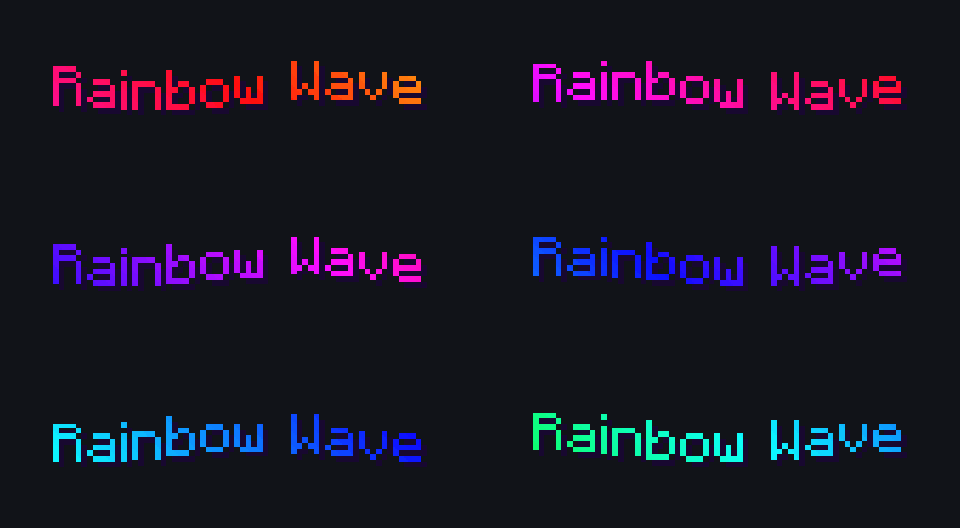
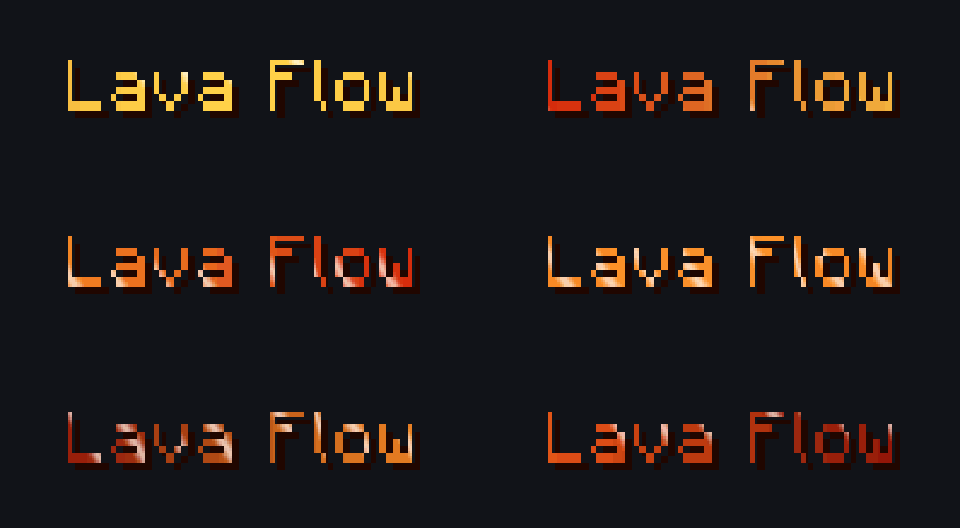
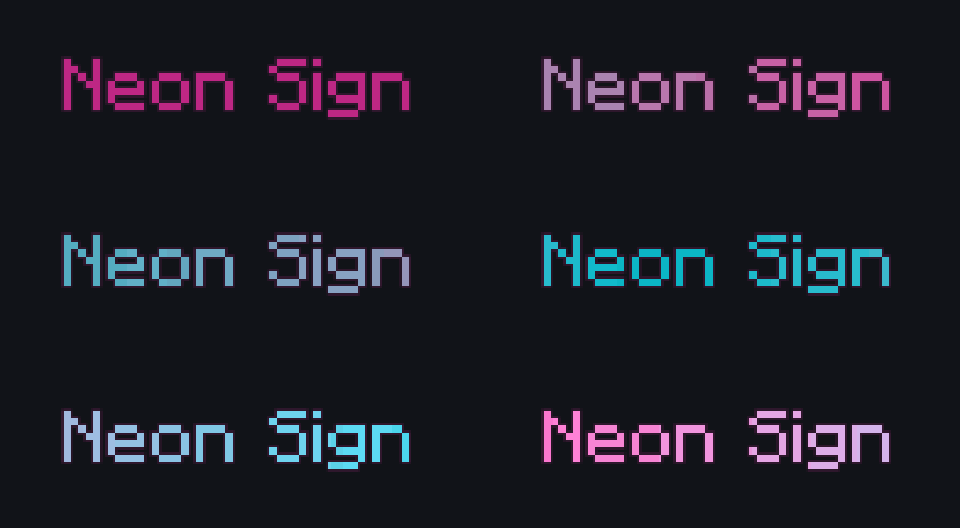
Examples from the original pack:
#Where effects work
Effects work anywhere Minecraft draws hex-colored text. The pack documentation lists these places:
- Chat and join messages
- The tab list
- Scoreboards
- Holograms
- Item names and lore
- Bossbars
- Signs
- NPC names
- Action bars and titles
- Rank and tag prefixes from plugins such as LuckPerms or DeluxeTags
Menus work the same way. The bonus DeluxeMenus showcase names every item in its own effect color.
Some of the older effects draw a little outside each letter. On most clients that is fine, but on a few it can overlap neighboring lines in chat, the tab list or the scoreboard. The 39 new Mega Pack effects stay inside each letter, so they render at normal size in all of these. For an older effect on an affected client, use it in the world (holograms, nameplates, signs) or choose a new effect for chat.
#Ranks and prefixes
Because effects are driven only by color, an animated rank is just a prefix written in an effect color. LuckPerms and DeluxeTags are named in the pack documentation as working. A prefix value looks like this (#540030 is Crimson Admin):
<#540030>[Admin] Pick rank effects from the Ranks and Status category in the catalog, for example Owner Crown, Admin Circuit, Moderator Shield, Legend Aura and VIP Sparkle, or the Bronze, Silver and Platinum tiers in the Mega Pack. Check that the plugin that builds your prefix passes hex colors through to the client, otherwise you will see the raw tag as text.
#DeluxeMenus showcase menu
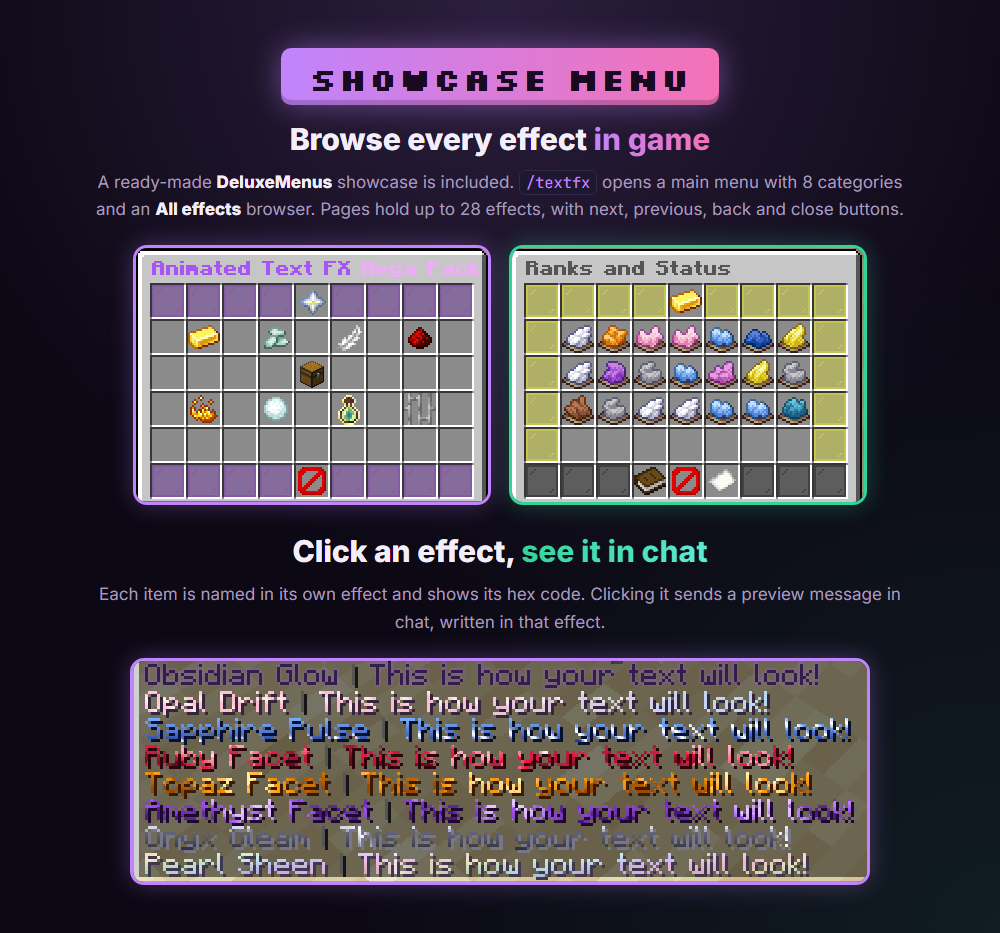
Vol. 3, the Halloween Edition, the Christmas Edition and the Mega Pack include a ready-made DeluxeMenus GUI that shows every effect, each item named in its own effect color with the hex code in the lore. Clicking an effect sends a preview message in chat written in that effect. It needs the DeluxeMenus plugin and Minecraft 1.16 or newer. Vol. 1 and Vol. 2 do not include a menu.
Dropping the file in the folder is not enough. DeluxeMenus only loads menus registered in its config.yml.
Vol. 3, Halloween and Christmas (one menu file)
- Copy the menu file into
plugins/DeluxeMenus/gui_menus/. It isvol3-showcase-menu.ymlfor Vol. 3,halloween-showcase-menu.ymlfor Halloween andchristmas-showcase-menu.ymlfor Christmas. - Register it under
gui_menusinplugins/DeluxeMenus/config.yml, for example for Vol. 3:
gui_menus:
  animated_text_fx_vol3:
    file: vol3-showcase-menu.yml
The name on the left is your choice as long as it is unique. file: must match the file name exactly, including .yml. Use spaces, never tabs. Then run /dm reload. Default commands: /textfx3, /halloweenfx, /christmasfx.
Mega Pack (16 menu files)
Copy every textfx_*.yml file into plugins/DeluxeMenus/gui_menus/ and register all 16 menus. The names on the left are used by the buttons to open each other, so do not rename them.
gui_menus:
  textfx_main:
    file: textfx_main.yml
  textfx_ranks_1:
    file: textfx_ranks_1.yml
  textfx_gradients_1:
    file: textfx_gradients_1.yml
  textfx_motion_1:
    file: textfx_motion_1.yml
  textfx_tech_1:
    file: textfx_tech_1.yml
  textfx_elemental_1:
    file: textfx_elemental_1.yml
  textfx_seasonal_1:
    file: textfx_seasonal_1.yml
  textfx_seasonal_2:
    file: textfx_seasonal_2.yml
  textfx_game_1:
    file: textfx_game_1.yml
  textfx_prison_1:
    file: textfx_prison_1.yml
  textfx_all_1:
    file: textfx_all_1.yml
  textfx_all_2:
    file: textfx_all_2.yml
  textfx_all_3:
    file: textfx_all_3.yml
  textfx_all_4:
    file: textfx_all_4.yml
  textfx_all_5:
    file: textfx_all_5.yml
  textfx_all_6:
    file: textfx_all_6.yml
If you already have menus, keep them and add these below with the same indentation. Run /dm reload, then open the showcase with /textfx (or /dm open textfx_main). The main menu has 8 category buttons plus an All effects browser. Pages hold up to 28 effects, with Previous page, Back to categories, Close, page number and Next page buttons on the bottom row.
Customizing the menu
- Command name: in
textfx_main.ymlchangeopen_command: textfx, then/dm reload. - Titles, icons and positions: edit
menu_title,material:orslot:in any file. Slots count from 0 (top left) to 53 (bottom right). - Using an effect color elsewhere in DeluxeMenus: write it as
&#RRGGBB, for exampleȜC00Ruby Facet. - Do not change the hex code in an effect's
display_nameor message. The effect only plays when the color is exact.
#Moving to the Mega Pack
The Mega Pack is the combined pack: it contains every effect from Animated Text FX (Vol. 1), Vol. 2, Vol. 3, the Halloween Edition and the Christmas Edition, with the same hex codes and the same look. To switch:
- Uninstall the earlier pack or packs you had, from the same folders used by the install steps above.
- Install the Mega Pack variant that matches your server.
- Keep your configs as they are. Every old hex code still works.
One name changed: the Christmas Edition had two effects called Evergreen Pulse. #54083C is now listed as Evergreen Pulse II. Its code and look did not change.
#Colors and speed
The effects are fixed. Each hex code maps to one built-in effect, and the pack does not ship a config file for effect colors or speed. What you choose is which effect you use and where. In the showcase menu you can also change the command, titles and icons.
The hex color you write is only a trigger. You cannot tint an effect by changing the code: if you adjust a digit you will trigger a different effect or none. Every channel of an effect color (each pair of hex digits) is a multiple of 4, so a code you retype or approximate may not match anything.
#Effect catalog
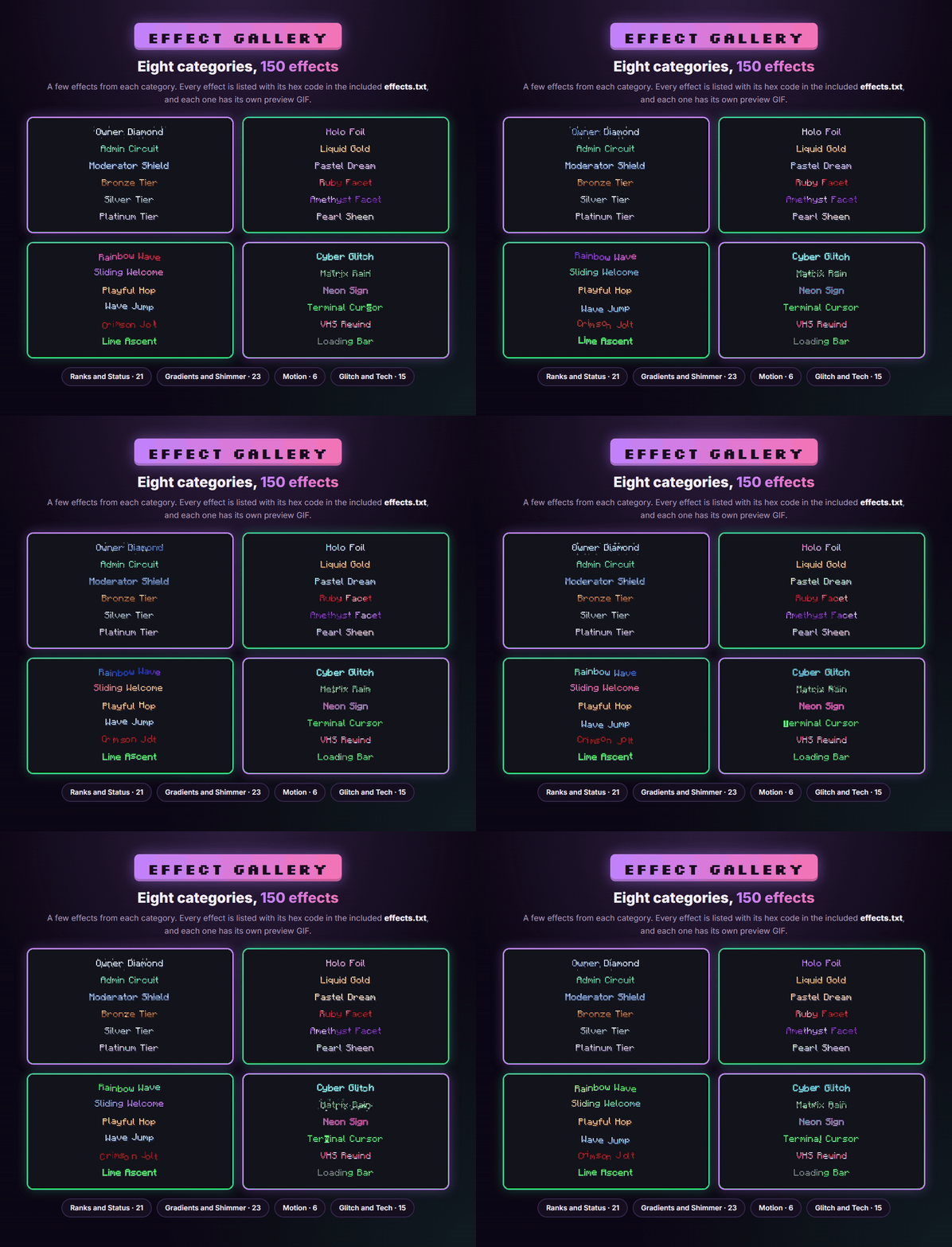
The Mega Pack has 150 effects in 8 categories. The categories are the ones used by the pack's effects.txt and the DeluxeMenus showcase. The next sections list every effect with its hex code. The same list ships in the download as effects.txt, along with a preview GIF for every effect.
| Category | Effects |
|---|---|
| Ranks and Status | 21 |
| Gradients and Shimmer | 23 |
| Motion | 6 |
| Glitch and Tech | 15 |
| Elemental and Nature | 21 |
| Seasonal | 40 |
| Game and Fun | 18 |
| Prison | 6 |
#Ranks and Status (21)
21 effects. The Origin column shows which pack the effect first shipped in. Every effect is in the Mega Pack.
| Hex code | Effect | Origin |
|---|---|---|
#54002C | Owner Diamond | Vol. 1 |
#540030 | Crimson Admin | Vol. 1 |
#540064 | Gilded VIP | Vol. 1 |
#540420 | Owner Crown | Vol. 3 |
#540424 | Admin Circuit | Vol. 3 |
#540428 | Moderator Shield | Vol. 3 |
#540430 | Legend Aura | Vol. 3 |
#540434 | VIP Sparkle | Vol. 3 |
#540438 | Royal Velvet | Vol. 3 |
#54043C | Common | Vol. 3 |
#540440 | Rare Pulse | Vol. 3 |
#540444 | Vivid Pulse | Vol. 3 |
#540448 | Gilded Radiance | Vol. 3 |
#54044C | Mythic Prism | Vol. 3 |
#540C14 | Bronze Tier | Mega Pack (new) |
#540C18 | Silver Tier | Mega Pack (new) |
#540C1C | Platinum Tier | Mega Pack (new) |
#540C20 | Founder Crest | Mega Pack (new) |
#540C24 | Helper Hue | Mega Pack (new) |
#540C28 | Builder Blueprint | Mega Pack (new) |
#540C2C | VIP Plus | Mega Pack (new) |
#Gradients and Shimmer (23)
23 effects. The Origin column shows which pack the effect first shipped in. Every effect is in the Mega Pack.
| Hex code | Effect | Origin |
|---|---|---|
#540004 | Blaze Gradient | Vol. 1 |
#54000C | Sunset Blend | Vol. 1 |
#540010 | Starlit Galaxy | Vol. 1 |
#540024 | Pastel Dream | Vol. 1 |
#540034 | Star Border | Vol. 1 |
#540074 | Holo Foil | Vol. 2 |
#540088 | Emerald Shimmer | Vol. 2 |
#540094 | Candy Swirl | Vol. 2 |
#540098 | Prism Split | Vol. 2 |
#5400A0 | Liquid Gold | Vol. 2 |
#5400A4 | Chrome Shine | Vol. 2 |
#5400B4 | Spotlight Sweep | Vol. 2 |
#5400CC | Warp Speed | Vol. 2 |
#54046C | Announcement Sweep | Vol. 3 |
#540470 | Broadcast Sweep | Vol. 3 |
#540484 | Obsidian Glow | Vol. 3 |
#540488 | Opal Drift | Vol. 3 |
#54048C | Sapphire Pulse | Vol. 3 |
#540C00 | Ruby Facet | Mega Pack (new) |
#540C04 | Topaz Facet | Mega Pack (new) |
#540C08 | Amethyst Facet | Mega Pack (new) |
#540C0C | Onyx Gleam | Mega Pack (new) |
#540C10 | Pearl Sheen | Mega Pack (new) |
#Motion (6)
6 effects. The Origin column shows which pack the effect first shipped in. Every effect is in the Mega Pack.
| Hex code | Effect | Origin |
|---|---|---|
#540000 | Rainbow Wave | Vol. 1 |
#540060 | Sliding Welcome | Vol. 1 |
#5400A8 | Playful Hop | Vol. 2 |
#5400AC | Wave Jump | Vol. 2 |
#540450 | Crimson Jolt | Vol. 3 |
#54045C | Lime Ascent | Vol. 3 |
#Glitch and Tech (15)
15 effects. The Origin column shows which pack the effect first shipped in. Every effect is in the Mega Pack.
| Hex code | Effect | Origin |
|---|---|---|
#540020 | Neon Pulse | Vol. 1 |
#54003C | Matrix Rain | Vol. 1 |
#54004C | Neon Sign | Vol. 1 |
#540058 | Retro Wave | Vol. 1 |
#540080 | Vaporwave Scan | Vol. 2 |
#5400C8 | Strict Typewriter | Vol. 2 |
#5400D4 | Cyber Glitch | Vol. 2 |
#5400D8 | Pixel Dissolve | Vol. 2 |
#5400F0 | Dead Channel | Vol. 2 |
#540480 | Plasma Swirl | Vol. 3 |
#540C48 | Terminal Cursor | Mega Pack (new) |
#540C4C | Hologram Scan | Mega Pack (new) |
#540C54 | VHS Rewind | Mega Pack (new) |
#540C58 | Loading Bar | Mega Pack (new) |
#540C5C | Barcode Scan | Mega Pack (new) |
#Elemental and Nature (21)
21 effects. The Origin column shows which pack the effect first shipped in. Every effect is in the Mega Pack.
| Hex code | Effect | Origin |
|---|---|---|
#540008 | Ocean Tide | Vol. 1 |
#540014 | Toxic Slime | Vol. 1 |
#54001C | Lava Flow | Vol. 1 |
#540038 | Lightning Bolt | Vol. 1 |
#540044 | Aurora Borealis | Vol. 1 |
#540048 | Molten Core | Vol. 1 |
#54006C | Creeping Frost | Vol. 1 |
#5400BC | Sakura Petals | Vol. 2 |
#5400F4 | Soul Wisps | Vol. 2 |
#5400F8 | Thunder Burst | Vol. 2 |
#5400FC | Ice Crystal | Vol. 2 |
#540404 | Ashen Wisps | Vol. 2 |
#54040C | Rising Inferno | Vol. 2 |
#540C34 | Solar Flare | Mega Pack (new) |
#540C38 | Moonlight | Mega Pack (new) |
#540C3C | Eclipse | Mega Pack (new) |
#540C40 | Rain Curtain | Mega Pack (new) |
#540C44 | Sandstorm | Mega Pack (new) |
#540C78 | Fireflies | Mega Pack (new) |
#540C7C | Autumn Leaves | Mega Pack (new) |
#540C80 | Coral Reef | Mega Pack (new) |
#Seasonal (40)
40 effects. The Origin column shows which pack the effect first shipped in. Every effect is in the Mega Pack.
This category covers Halloween, Christmas and other seasonal looks, including four new Mega Pack effects (Valentine Romance, Clover Luck, Summer Beach, Fireworks Finale).
| Hex code | Effect | Origin |
|---|---|---|
#540070 | Blood Drip | Vol. 1 |
#5400E8 | Ghost Haunt | Vol. 2 |
#540410 | Crisp Snowfall | Vol. 2 |
#540414 | Spooky Pumpkin | Vol. 2 |
#540418 | String Lights | Vol. 2 |
#540490 | Pale Phantom | Vol. 3 |
#540494 | Witch Brew | Halloween |
#540498 | Blood Moon | Halloween |
#54049C | Cobweb Creep | Halloween |
#5404A8 | Skeleton Rattle | Halloween |
#5404B4 | Possessed Soul | Halloween |
#5404B8 | Graveyard Mist | Halloween |
#5404BC | Bat Swarm | Halloween |
#5404C4 | Vampire Fang | Halloween |
#5404C8 | Candy Corn | Halloween |
#5404CC | Black Cat Eyes | Halloween |
#5404D0 | Candy Cane Twist | Christmas |
#5404D4 | Snowflake Drift | Christmas |
#5404D8 | Frosted Window | Christmas |
#5404E0 | Evergreen Pulse | Christmas |
#5404E4 | Ornament Flash | Christmas |
#5404E8 | Santa Suit | Christmas |
#5404EC | Gift Ribbon | Christmas |
#5404F0 | Holly Berry | Christmas |
#5404F4 | North Pole Aurora | Christmas |
#540808 | Jingle Bounce | Christmas |
#540810 | Tinsel Sparkle | Christmas |
#540814 | Hot Cocoa | Christmas |
#54081C | Gingerbread Bake | Christmas |
#540820 | Silent Night | Christmas |
#540828 | Elf Hop | Christmas |
#54082C | Gold Star | Christmas |
#540830 | Smoldering Coal | Christmas |
#540834 | New Year Burst | Christmas |
#54083C | Evergreen Pulse II | Christmas |
#540844 | Rudolph Nose | Christmas |
#540C84 | Valentine Romance | Mega Pack (new) |
#540C88 | Clover Luck | Mega Pack (new) |
#540C8C | Summer Beach | Mega Pack (new) |
#540C90 | Fireworks Finale | Mega Pack (new) |
#Game and Fun (18)
18 effects. The Origin column shows which pack the effect first shipped in. Every effect is in the Mega Pack.
| Hex code | Effect | Origin |
|---|---|---|
#540040 | Heartbeat Pulse | Vol. 1 |
#540050 | Confetti Burst | Vol. 1 |
#54005C | Level Burst | Vol. 1 |
#5400C4 | Fuse Countdown | Vol. 2 |
#5400D0 | Gold Reels | Vol. 2 |
#5400DC | Ender Void | Vol. 2 |
#5400E4 | Wither Decay | Vol. 2 |
#54041C | Shatter Crack | Vol. 2 |
#540458 | Victory Banner | Vol. 3 |
#540468 | Quest Laurel | Vol. 3 |
#540478 | Quest Triumph | Vol. 3 |
#54047C | Dragon Scale | Vol. 3 |
#540C50 | Insert Coin | Mega Pack (new) |
#540C60 | Critical Hit | Mega Pack (new) |
#540C64 | Power-Up | Mega Pack (new) |
#540C6C | Game Over | Mega Pack (new) |
#540C70 | Treasure Chest | Mega Pack (new) |
#540C74 | XP Burst | Mega Pack (new) |
#Prison (6)
6 effects. The Origin column shows which pack the effect first shipped in. Every effect is in the Mega Pack.
| Hex code | Effect | Origin |
|---|---|---|
#540454 | Warning Siren | Vol. 3 |
#540474 | Zero Hour | Vol. 3 |
#540C94 | Prisoner Stripes | Mega Pack (new) |
#540C98 | Warden Badge | Mega Pack (new) |
#540C9C | Gold Rush | Mega Pack (new) |
#540CA0 | Lockdown | Mega Pack (new) |
#Compatibility
The resource pack declares pack formats 18 to 120 (Minecraft 1.20.2 and newer) and carries a shader overlay for each range where the vanilla text shader changed. Minecraft picks the right overlay by itself.
- Supported setups: vanilla resource pack, ItemsAdder, ItemsAdder + BetterHUD, Nexo, MythicHUD and BetterHUD. BetterHUD files are provided for BetterHud 1.x, 2.0.x and 2.1.x.
- Chat plugins: LuckPerms, DeluxeTags and similar plugins that output hex colors work for animated ranks and prefixes.
- Without the pack: players see the flat color.
- Not covered by the files: the documentation does not mention Iris, OptiFine or Sodium, so test those on your own setup if your players use them.
| Overlay folder | Pack formats |
|---|---|
technotypist_1_20_2 | 18 to 31 |
technotypist_1_20_5 | 32 to 35 |
technotypist_1_21_2 | 36 to 56 |
technotypist_1_21_6 | 57 to 83 |
technotypist_26_1 | 84 to 87 |
technotypist_26_2 | 88 to 96 |
technotypist_26_3 | 97 to 120 |
#Performance and limits
- Effects are drawn by a shader on the player's client. The pack adds no plugin, command or server task; the server only sends the resource pack as usual.
- All effects of a pack live in one text shader, which is why only one text-effect pack can be active on a client.
- A custom font atlas other than the standard 256x256 sheet turns the effects off for that font. This is a deliberate guard to avoid smeared rendering.
- The 39 effects new in the Mega Pack never draw outside the letter box, so they render at normal size in chat, the tab list and the scoreboard.
- The documentation gives no frame-rate figures, so there are no measured numbers to quote.
#What is in the download
- Six pack variants (Resource Pack, ItemsAdder, ItemsAdder + BetterHUD, Nexo, MythicHUD, BetterHUD).
- A main
README.txtwith install steps and troubleshooting. Each variant zip also has its own shorter README. - Preview GIFs of every effect, and
effects.txtwith every effect and hex code in the Mega Pack. - The DeluxeMenus showcase in Vol. 3, Halloween, Christmas and the Mega Pack.
#Troubleshooting
The text shows the flat color and nothing animates
Only one resource pack on a client can own assets/minecraft/shaders/core/rendertype_text.*. If a player has more than one text-effect pack applied (an earlier Animated Text FX volume still installed, a pack in their own resourcepacks folder plus the server pack, or two plugin-generated packs), the pack that loads last overrides the other with no error. Remove the conflicting pack and have the player fully reconnect.
If that is not it, check that the pack reaches the player at all. If there is no download prompt on join, your plugin is not sending it. On Nexo, look in the console for "Invalid PackServer type specified" and fix Pack.server.type in settings.yml. Otherwise the shader may have failed to compile: check .minecraft/logs/latest.log on the client and search for "rendertype_text".
I do not even see the flat color, or I see the raw tag
The hex color is not reaching the client. Check the code is copied exactly (six digits), and that whatever sends the text (MiniMessage, a chat plugin, a LuckPerms prefix) really outputs a hex color and does not print a tag such as <#540C00> as plain text.
One effect does not work but the others do
Every channel of an effect color must be a multiple of 4. If you typed or tweaked a code by hand, you may have landed on a value that matches nothing. Copy the exact code from the catalog.
The effects work but my HUD disappeared
Two packs are fighting over the text shader, usually because a HUD plugin's pack and this pack are not merged correctly. Install the variant for your setup (ItemsAdder + BetterHUD, BetterHUD or MythicHUD) instead of the plain Resource Pack or the ItemsAdder-only pack next to a separate HUD plugin.
The font looks blurry or wrong, or effects are off
Effects deliberately switch off for a custom font atlas that is not the standard 256x256 sheet. If another resource pack has a large custom font, disable it temporarily to confirm.
Sparkles, outlines or glows look cut off or overlap in chat, tab list or scoreboard
Some of the older effects draw slightly outside each letter. On a few clients that can overlap neighboring lines. The 39 new Mega Pack effects never do this. For older effects on such clients, use them in holograms, nameplates or signs, or pick a new effect for chat.
Some effects look broken on Minecraft 26.2 (for example confetti)
A bug that affected Minecraft 26.2 clients only made some effects render outside the normal character box. It was fixed in a full patch (the 1.0.1 releases). Delete the old resource pack from your hosting plugin or server.properties and upload the updated one.
The variant I installed does nothing
A plugin-specific zip (Nexo, ItemsAdder) does nothing if that plugin is not installed, since there is nothing to build it into a resource pack. Look in your plugins folder for ItemsAdder, Nexo, BetterHud or MythicHUD to see which install section applies.
Can I install Vol. 1 and Vol. 2 together?
No. They would fight over the same shader. Use the Mega Pack, which contains both and all other volumes.
#Support
Check the troubleshooting section of the README in your download first. If you are still stuck, ask on the Discord: discord.gg/2CUufFxvKe. Questions about the combined pack or earlier purchases also go there.